
Trade copier for NinjaTrader 8
Trade one account.
Every account follows automatically.
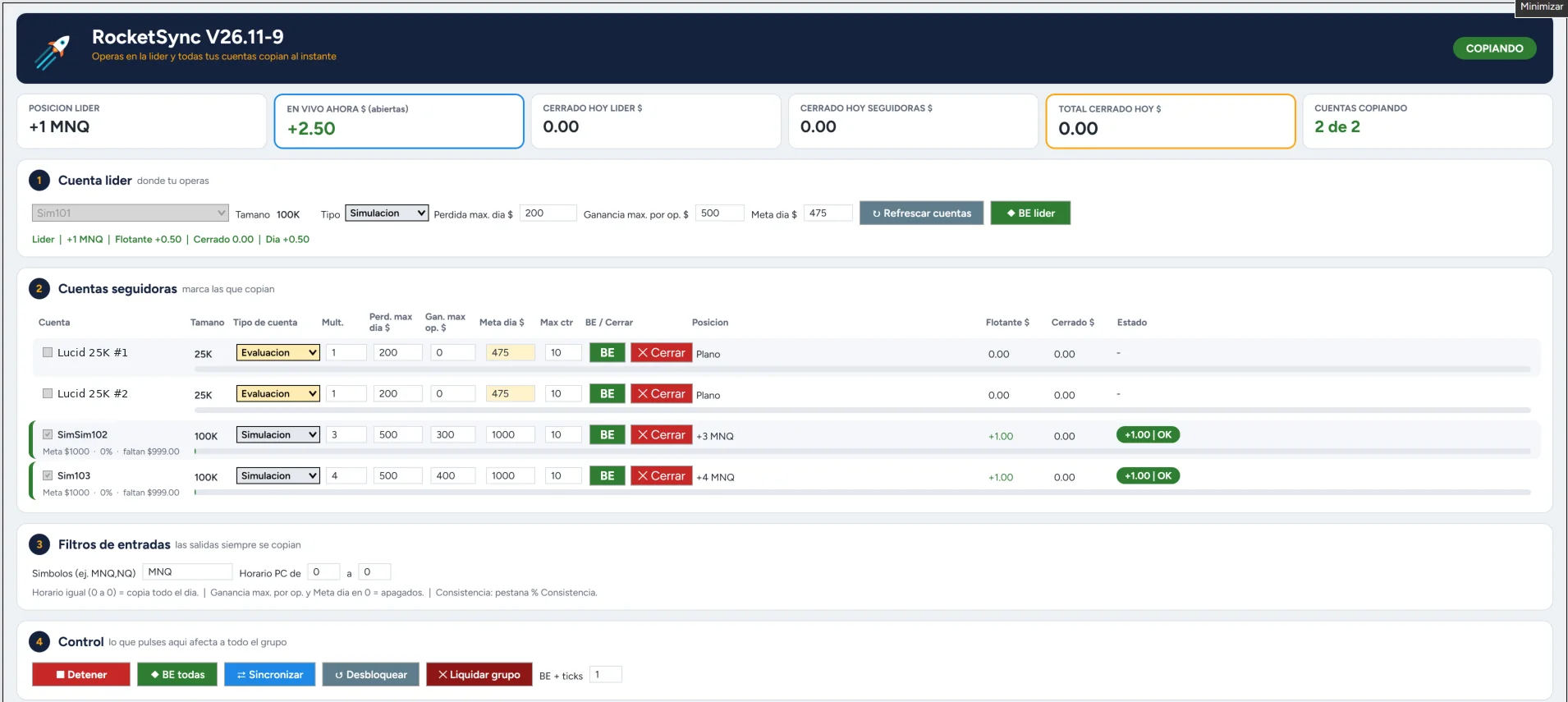
RocketSync is a trade copier for NinjaTrader 8: it copies every trade from your leader account to all your accounts and watches each one's limits, consistency and drawdown, to help you stay within your prop firm's rules.
- Any account size
- Any firm or broker on NinjaTrader 8
- English and Spanish
Features
Everything you need to trade many accounts with peace of mind
Automatic copying
Enter, exit or move your stop on the leader and every account follows, each with its own multiplier.
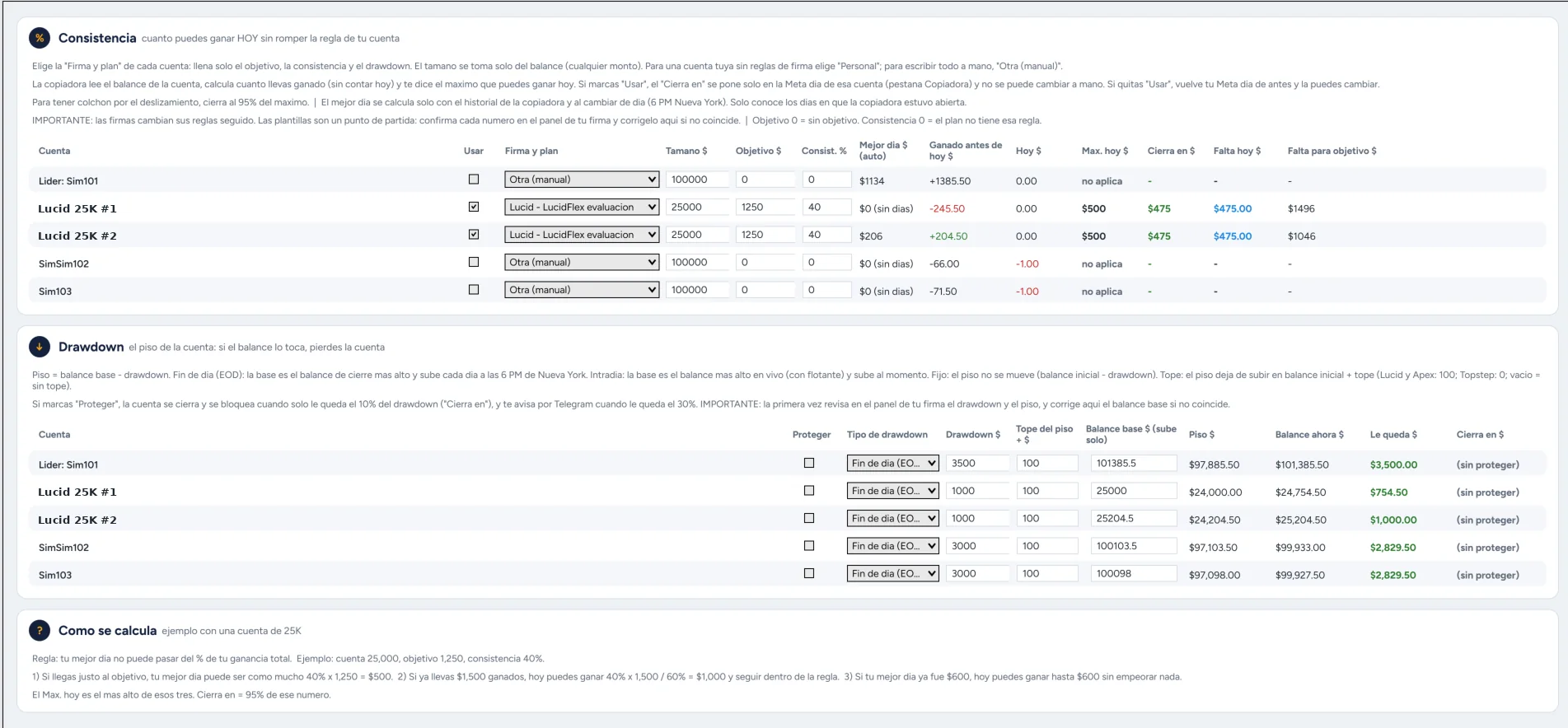
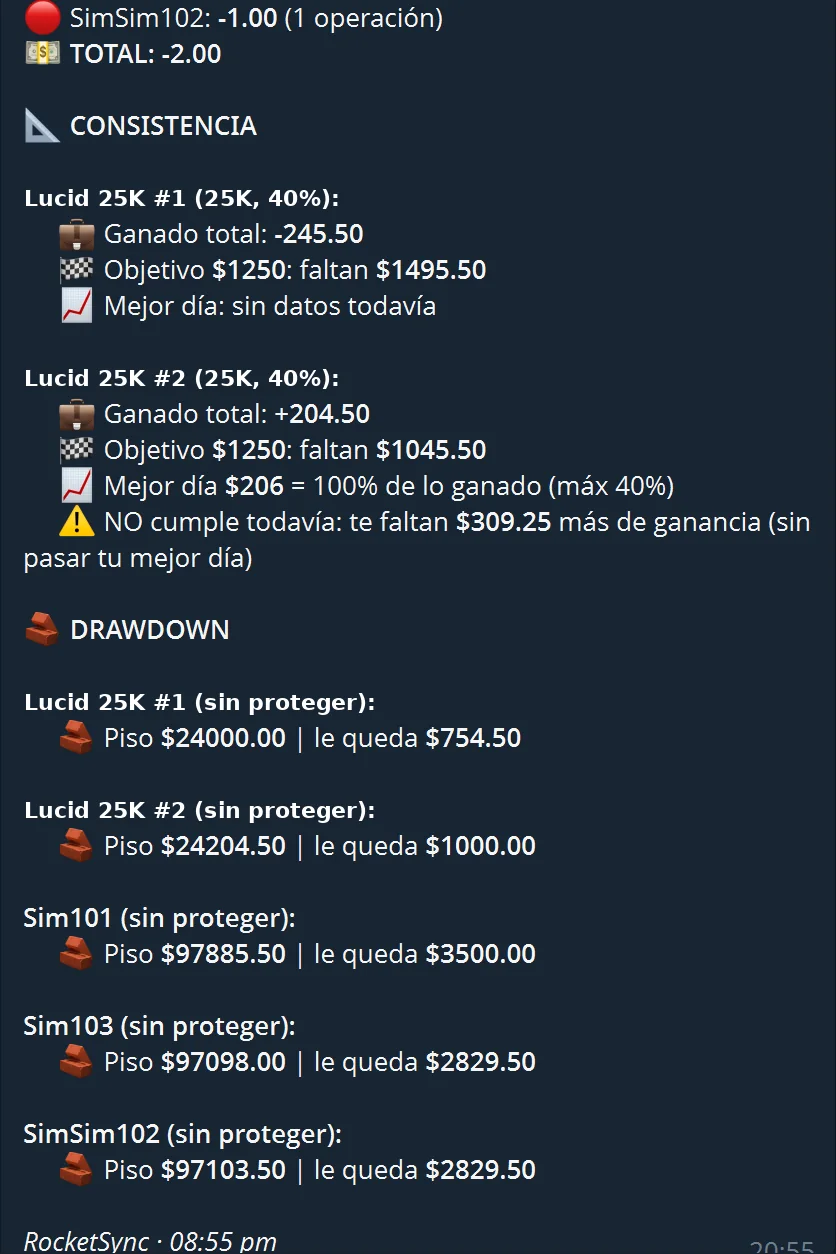
Automatic consistency
Works out how much you can make today within your firm's % and can close the account when reached.
Drawdown protection
Tracks your end-of-day, intraday or static floor and alerts you in time. It can send close orders before the limit, but execution depends on your connection, the market and the available price.
Firm templates
Pick your firm and plan and the target, consistency and drawdown fill in. Or set them by hand.
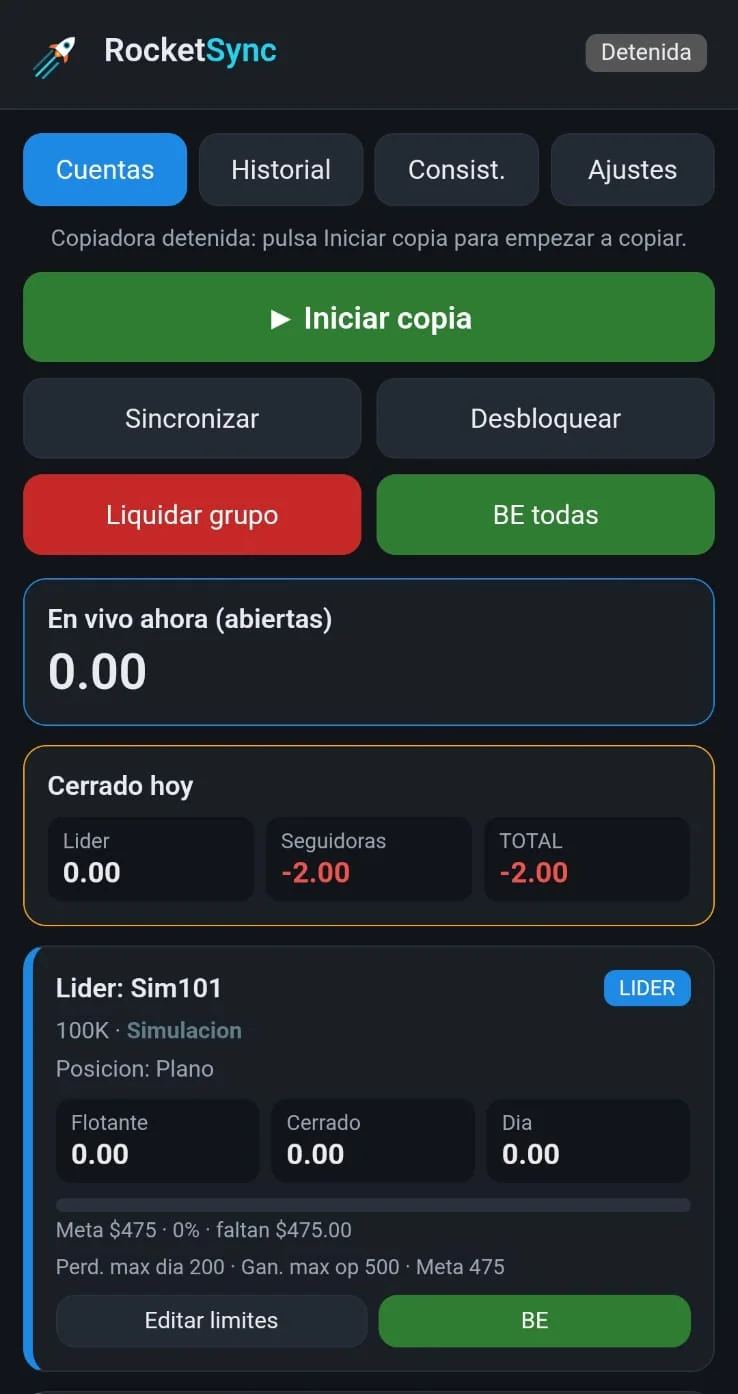
Phone panel
See and control your accounts from your phone or tablet over a private network.
Telegram alerts
Entries, exits, limits and disconnections reach your phone, plus an end-of-day summary.
Double safety
Checks that accounts are connected before closing and stops any account that falls out of sync.
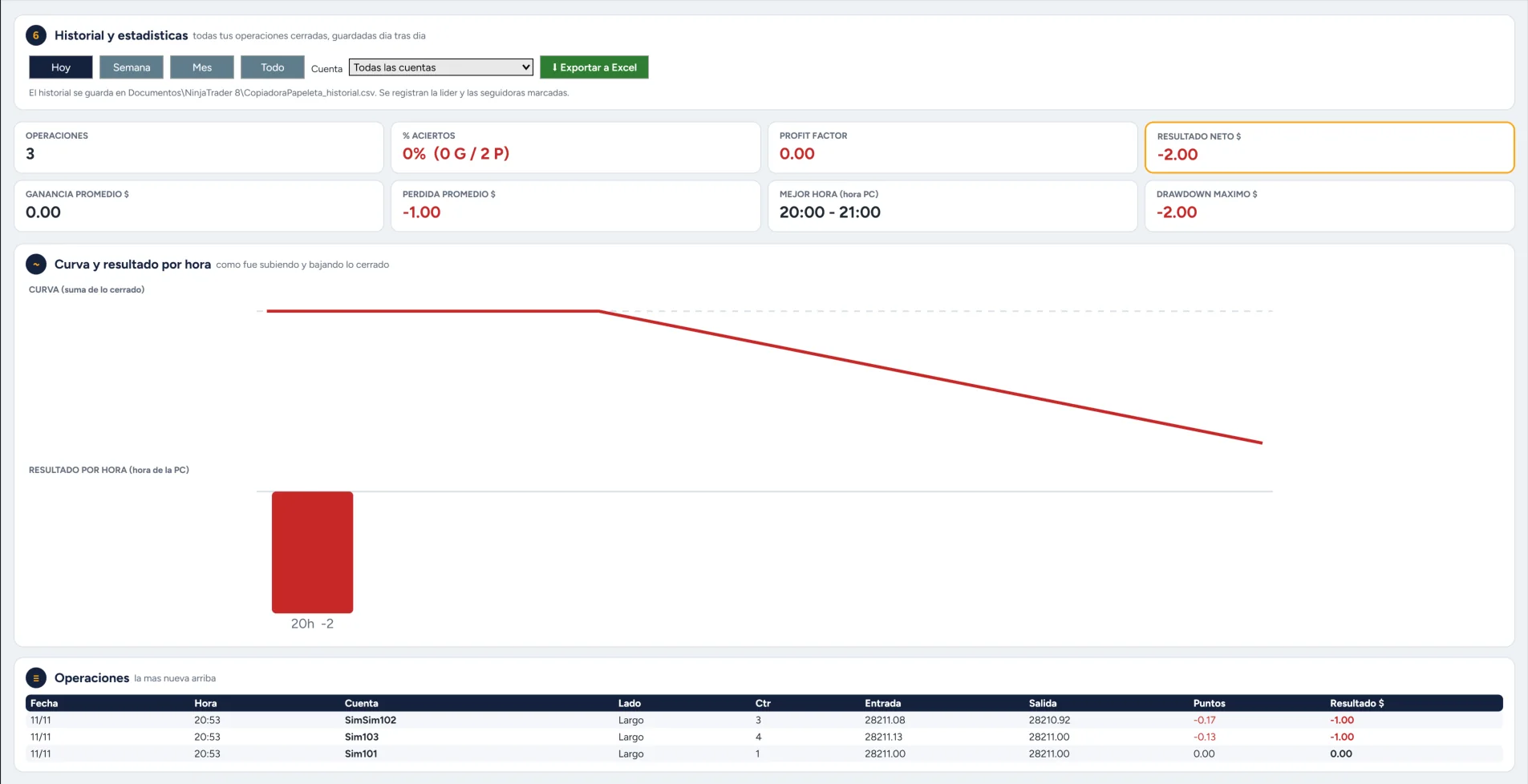
History and stats
Results curve, best hours and a CSV export of all your trades.
Real screenshots
This is what RocketSync looks like
Tap any screenshot to see it larger
Security
Your security comes first
Runs on your computer
It runs inside your NinjaTrader. Your trades and settings stay on your PC. If you turn on Telegram alerts, those messages go through Telegram's servers.
Never sees your passwords
RocketSync uses the accounts you already connected in NinjaTrader. It never asks for or stores your broker or firm password.
Encrypted keys
Your Telegram token and panel password are stored encrypted and only work on your PC and Windows user.
Panel over a private network
The phone panel asks for your password and is meant to be used over a private network between your devices (Tailscale), without opening your PC to the internet.
Double check
Before an automatic close it checks the accounts are connected and looks at the position again.
Black box
Everything RocketSync does is written to a daily log on your PC, so you can check what happened and when.
Comparison
Why RocketSync?
| Copying by hand | RocketSync | |
|---|---|---|
| Copy speed | Slow: one account at a time | Automatic, inside NinjaTrader |
| Risk of missing an account or entering the wrong size | High | Lower: copying is automatic |
| Consistency and drawdown per account | By hand, with a calculator | Included, with firm templates |
| How you pay | Free, but costs your time | One-time or monthly |
Comparison between copying trades by hand and using RocketSync.
How it works
Ready in 3 steps
01
Install
Import RocketSync into NinjaTrader 8. A step-by-step guide in English and Spanish is included.
02
Pick your accounts
Choose your leader and the accounts that follow it, with size, type and limits.
03
Trade
You trade the leader. RocketSync copies, watches the limits and alerts you.
Requirements
- Windows 10 or 11
NinjaTrader 8 only runs on Windows (a Windows VPS works too). - NinjaTrader 8.1.5 or later
Free; needed for the license and the 7-day trial. - Your accounts connected in NinjaTrader
From any firm or broker that works with NinjaTrader 8. - Stable internet
Your PC or VPS on while you want to copy. - Telegram (optional)
Free, for alerts and the daily summary. - Tailscale (optional)
Free, to use the panel from your phone or tablet.
Free tool
Consistency calculator
Find out how much you can make today without breaking your prop account's consistency rule. It's the same math RocketSync does for you.
You can make today up to
—
We suggest closing at — (95%, as a cushion)
For guidance only. Each firm calculates consistency its own way: always confirm the rules and numbers in your firm's dashboard.
Who we are
Made by traders, for traders
We are Alfredo Carvajal and Nelson Landestoy, futures traders. We built RocketSync because we wanted a copier that fit what we really need when trading several accounts: fast copying, respecting each firm's rules and keeping an eye on everything from the phone.
We use it on our own accounts and keep improving it with every version. See what's new →
Alfredo CarvajalCo-founder · Futures trader
Nelson LandestoyCo-founder · Futures trader
What's next
RocketSync keeps growing
Cross Order
Trade MNQ on the leader and copy NQ to followers, or the other way round.
VPS guide
Step by step to copy around the clock with your PC off.
History by date range
History export choosing the start and end date.
Expiry notice
Notice in the window and on Telegram before your monthly plan expires.
Planned features, no fixed date. What do you want first? Vote on our Discord.
Pricing
Coming soon: at launch, try it free for 7 days, then choose
Monthly
$29 /month
7 days free at launch · cancel anytime
- Every feature
- Multiple accounts of any size
- Phone panel and Telegram alerts
- Updates while subscribed
Lifetime
$249$99 one-time
−60%Save $150 · first 50 customers only
50 of 50 spots left
7 days free at launch · no monthly fees
- Everything in Monthly
- License for the product's lifetime
- Updates per the maintenance policy
- Email support
14-day money-back guarantee on your first payment. See terms
Sales open very soon. Email [email protected] or join our Discord to hear first.
FAQ
Frequently asked questions
Does it work with my firm?
It works with any firm or broker you connect in NinjaTrader 8. Always check whether your firm allows copying trades between your accounts.
Do I need a server or VPS?
No. RocketSync runs inside NinjaTrader on your own computer. You only need a VPS if you want it to copy while your PC is off.
Does my data leave my PC?
Your trades and settings are stored on your computer and passwords are encrypted. RocketSync does not send stats or diagnostics. Only what you turn on leaves your PC: Telegram alerts go through Telegram's servers, and the phone panel works over a private network between your devices.
Can I use it with just one account?
Yes. In monitor mode it watches your account's consistency, drawdown and limits and alerts you on Telegram, without copying anywhere.
How does the free trial work?
At launch: install RocketSync and the 7-day trial starts the first time you use it with your NinjaTrader user. No card needed to try it.
Where do I get help?
On our Discord: a support channel, new version announcements and live voice support. For licenses and payments email [email protected].
What if my internet drops or NinjaTrader closes?
RocketSync stops copying in the meantime, and if your PC's internet is down, Telegram alerts can't arrive either. Orders already at your broker stay there. When you're back, check your accounts and use Sync. To avoid depending on your home connection, you can use a VPS.
What if an account ends up different from the leader?
RocketSync marks it OUT OF SYNC and you can match it with Sync. If it stays out of sync for 10 seconds, it closes it and removes it from copying to protect it, and alerts you.
Does RocketSync guarantee I won't break my firm's rules?
No. Limits, consistency and drawdown protection are aids that depend on your PC, your connection and the numbers being set correctly. Always confirm the rules in your firm's dashboard and keep watching your accounts.
What happens to my positions if my monthly plan expires?
Without a license, NinjaTrader won't open RocketSync and copying stops. Check your plan date and keep your accounts flat before it expires. With the lifetime plan there is no monthly expiry: the license lasts as long as RocketSync remains available (the product's commercial life).
Can I get a refund?
Yes. You have 14 days from your first payment to ask for it for any reason, by emailing [email protected]. Once refunded, the license is deactivated. It applies once per customer; on the monthly plan it covers the first payment and you can cancel renewal anytime.
What if I change computers?
The license follows your NinjaTrader user, not the computer. Export your settings and import them on the new one.
Contact